










 Tuesday Marketing Notes (Number 9—November 22nd, 2005)
A B2B Marketing Newsletter for BMA Members
____________________________________________________________
Web Site Self-Defense for Marketing Managers:
How to Make the Guy With the Pony Tail Work for You, Instead of You Working For Him
Basic Specification and Prototyping Techniques to Develop Effective B2B Web Sites (Part 2)
by Eric Gagnon
This week, I’m going to describe a simple technique you can use to create a rough initial design for your company’s Web site, and then I’ll cover the importance of developing fast, rough, working prototypes for your company’s Web development efforts.
As a marketing manager, no one expects you to be a Web site designer or producer (and that’s not what I’m trying to show you here), but you do play an important role in driving the process of developing and executing an effective, marketing-oriented Web site for your company, when you work with your company’s Web site production team, or with an outside Web site developer on your company’s Web site projects.
But before you can drive this process, you must first decide what you want your company’s Web site to do for your company, and then place these ideas and objectives into a form that can be understood by your Web developer and translated into a functional, successful Web site.
The way to do this is to begin every Web site development project by preparing your own rough, initial outline and specification of the key functional elements you believe are important to your company’s Web project—and that’s what we’ll cover here.
Outside Web designers and developers (the guys with the pony tails) are either “artists,” or “techies.” They have little real-world sales experience and, if they’re an outside vendor, minimal background knowledge of your product’s sales benefits or your company’s marketing objectives. Your initial outline specification starts every Web project out on the right track, by keeping it firmly anchored in the reality of your company’s marketing requirements, as you see them.
After all, it’s your responsibility as a marketing professional to drive the process of developing Web sites that are grounded in this reality of moving interested site visitors one step closer to buying your product. If, at the end of this costly and laborious process, you end up with a Web site that doesn’t effectively communicate your product’s key benefits in a way that turns site visitors into prospects, then people will be coming to you (and not pony tail guy) to ask why it’s not working.
I’ll detail a three-step Web design and production process that gives you the basic background knowledge needed to work with a Web developer to produce a Web site that’s effective in presenting your product’s most compelling sales benefits.
These techniques apply both to development of an entirely new Web site for your company, and ongoing revisions and improvements to your company’s existing site.
Let me stress that you are not designing Web sites here, or dictating the final form of your site. This outline is a stake in the ground that gives you and your Web design team a starting point for your site development effort, not a hard-and-fast, formal design spec.
If you’re a marketing manager, or if you’re on the agency side dealing with a Web producer, this outline spec clarifies the objectives and content for your site project, and allows you to deal with confidence on any site project with your Web development team.
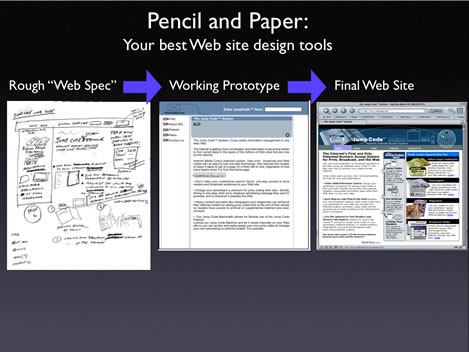
Your Two Best Web Development Tools: Pencil and Paper
First, start your Web outlining process by shutting off your computer and taking out your pencil and notepad. Quality Web site development always begins as the process of deciding:
• What content you have;
• Where it should be placed on your Web site;
• What is most important for your audience to see first
Translated into harder-hitting, marketing-oriented objectives, your own Web site specification should help your company’s Web developers answer these questions:
• What are we selling?
• How should this information be organized on our Web site?
• What is the most important thing we want our prospects to do when they visit our Web site?
This initial outline serves as your Web developer’s starting point in their execution of your company’s Web site. It’s not a hard design spec, and should never be seen as a limit to creativity or improvement. If you are working with a talented Web developer, it’s likely they will expand and enhance your initial vision of the site documented in your outline, adding their own creative, useful, and sales-enhancing ideas to the project along the way.
Creating a Rough Draft of Your Web Site’s Layout
To begin the process of creating your own basic Web site layout in rough form, start by jotting down some notes to answer three questions:
1.) What does our company do, what products do we sell, and what’s the best thing about these products? Write this down, in 30 words or less. This is the “Elevator Pitch” sales copywriting exercise we covered in the October 11th issue of TMN;
2.) What are the six most important things I want my market to KNOW about my company and its products? List the most important, general facts about your company, and the most important benefits of your company’s product or service, as in these examples:
• Your company’s product line;
• Product technical specs;
• On-line demo of your company’s product in action;
• Product applications and how-to tips;
• Customer endorsements and testimonials;
• Company news;
• Management profiles/executive team;
• Downloadable, free software “helper applications;”
• Free e-mail newsletter
Create your own list of six items, then rank them in order from 1 (most important), to 6 (least important), as a top-to-bottom list (or more than six items, if necessary);
3.) What are the three most important things I want prospects to DO when they access our company’s Web site? Think of this as your “call to action” to interested potential buyers who visit your company’s Web site. Select from the ideas below, or jot down any other “Do” steps that apply to your company and your market:
• Order now;
• Visit our online store;
• Request an estimate;
• Request a print catalog;
• Contact us;
• See our best-selling products;
• Find a location near you;
• Get a free sample
Write down your own list of these sales “action” steps, as simple two-to four-word sentences, similar to the ones above. Select no more than three of the most important of these, and rank them in 1-2-3… order, from most important to least important, left to right on a sheet of paper (you can use more than three “do” options, if necessary).
The result of steps 1.), 2.), and 3.) above forms the basis of your rough layout specification for your company’s preliminary site design.
“KNOW” and “DO” Site Template
Once you’ve sketched out the “Know” and “Do” options from the previous section, the template below shows you where these options would fit, as clickable links by users in a rough, working design for your Web site…
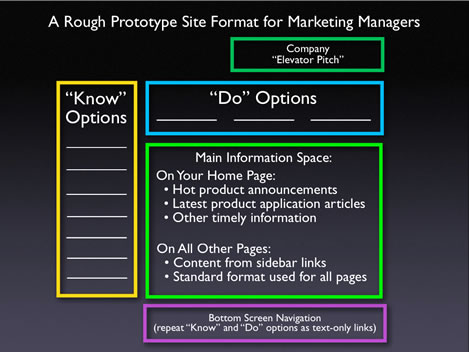
The “KNOW” options (from previous step 2.) are the main content of your company’s Web site. On the final version of your site, each of these “Know” options become links to their own, detailed information features on your site;
The “DO” options (from previous step 3.) are the top-priority action steps you want site visitors to take, once they’ve seen enough information on your Web site about your company, its products, and their applications and benefits (contained in the “Know” options above).
Write in the “Do” and “Know” options you’ve sketched out from the previous step into the blank spaces provided on the screen template above.
Write in the “Do” features, from the most-important on the left-hand side, to less important on the right, on the top of the screen template. Likewise, the “Know” options run most-important to less-important, from top to bottom on the left-hand sidebar.
The “Description” box, shown on the upper-right-hand side of the template, contains the brief summary of your company, its products, and their benefits (your “Elevator Pitch”), you’ve written from step 1.) of the previous exercise.
Once you’ve sketched out your site outline’s “Know” and “Do” links, create a separate page for the content for each of your “Know” and “Do” links, jotting down text notes for each of these sub-pages, filling in the content and functionality of these individual links in your site outline.
The “Information Hole”
The main area for content on a Web page is its “Information Hole,” derived from “news hole,” a term used by newspaper editors to describe the space used for the placement of news articles in a newspaper’s layout template.
Your Web site’s “Information Hole” is the area where text and other selling content is displayed for all the pages of your site. This is where the actual content for the “Know” and “Do” options for your site are displayed when selected by users as clickable links from any of the “Know” options along the left-hand sidebar on every screen of your Web site, or from any of the “Do” options at the top of every screen on your site.
You’ve now created an initial design spec that can be translated into a rough working prototype for your site.
The Next Step: Get a Prototype of Your Web Site Up, as Fast as You Can
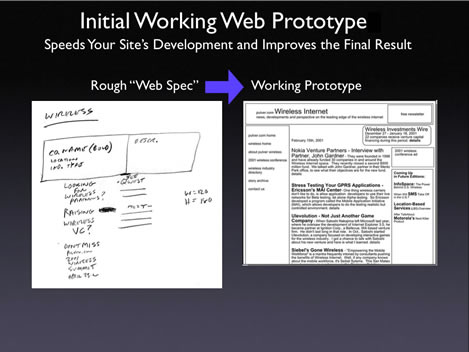
Once you’ve created your “KNOW” and “DO” outline spec, and you’ve discussed it with your team, it’s important that the rough specification you and your team are working on be turned into a rough, working online prototype as quickly as possible. This can usually be done in a few days.
Your first, rough, online prototype is a crude, text-only version of your site project. At this stage, it won’t contain any graphic elements or back-end functionality, such as CGI database links or other programming features. The prototype should, however, resemble the rough initial structure of your Web outline, containing links to all of the “Know” and “Do” pages you’ve sketched out, and whatever text content is available to fill in any of these “Know” and “Do” branches of your site.
Shown below is an example of a first prototype for an actual Web site project …
Your Web site prototype serves three very important purposes:
The prototype helps develop your site’s navigation and usability: First, as an actual, functioning version of your Web site, the prototype lets you and your team test the usability of your site during the development process. The prototype answers important site navigation and organization questions, such as whether or not a specific section of your site should be accessible from one link, or from another;
The prototype gives your project a fixed location: Second, since Web development projects are collaborative efforts, usually involving at least three or more individuals who may each be working at different locations, the prototype quickly becomes the “virtual location” where each team member can make changes and enhancements for others to see, test, and comment on;
The prototype makes your project real: Third, and most important, setting up a prototype in a fixed location makes every Web development project “real,” providing your team members with a fixed, working (albeit rough) version of what will lead to the final version of your site.
The sooner you can get your first Web site prototype put together, the sooner you and your team can start to improve it, adding in more text and content, graphics, and other functionality as this prototype rapidly evolves into the final working version of your site.
In Web development projects, you’ll find the “hurry up” effort you exert up-front to get your prototype built pays off by helping to make the rest of the site project move along much faster.
Once Your Web Prototype is Up and Running, Push its Development Through to the Final Version
The other advantage of starting your Web development project with a rough outline or sketch based on a template, like the “Know” and “Do” template, is that this helps to streamline the process of moving your Web site from your initial, hand-written sketch, to your initial prototype, and then on to the first, graphically-based versions of your site.
Your use of this “KNOW” and “DO” template is not intended to dictate the final appearance or functionality of your site. It’s merely a tool that helps you lay down a marker for your Web project, an opening concept meant to invite the constructive contribution of new ideas from members of your Web development team. If your Web developer is a cooperative, confident professional, they’ll appreciate having an initial starting point and set of ideas around which to base their own interpretation of your site.
More than any other type of marketing project, Web development projects tend to be very fluid and fast-moving, so the final version of your Web site will look radically different than your initial sketch. As you, your Web development team, and your Web site’s graphic designer work and brainstorm together, it is likely the members of your team will bring their own new ideas to the project.
It’s also likely that some of their new ideas will greatly improve the final version of your company’s Web site, and this means your original sketch design of the site will be changed, a little or a lot, and this is all to the good.
Every marketing project, especially a B2B Web site, gets done faster and better when someone puts an initial outline on the table. Creating an initial outline spec, and rapidly turning this spec into a working prototype, is the best way to gain the confidence and respect of “pony tail guy,” and to develop a Web site that effectively presents and sells your company’s products.
Next week, I’ll cover the keys to developing and executing compelling Web video presentations for your company’s B2B Web site …
Comments? Suggestions? Send them to me at eric@realmarkets.net
_____________________________________________________________
Eric Gagnon (eric@realmarkets.net), is president of GAA, a sales and business development consulting firm, and is the author of The Marketing Manager’s Handbook, the master study guide for the Business Marketing Association’s Marketing Skills Assessment, Skill Builder, and Certification (MSA/B/C) programs.
For more information on The Marketing Manager’s Handbook, available to BMA members at a special discount, link to:
http://www.businessmarketinginstitute.com/book.html
_____________________________________________________________
Test, Train, and Build Your B2B Marketing Skills for Better Sales Success: BMA Announces New Assessment, Training, and Certification for B2B Marketing Managers
For more information on the new BMA Marketing Skills Assessment, Skill Building and Certification (MSA/B/C) training and professional development program, visit http://www.businessmarketinginstitute.com